
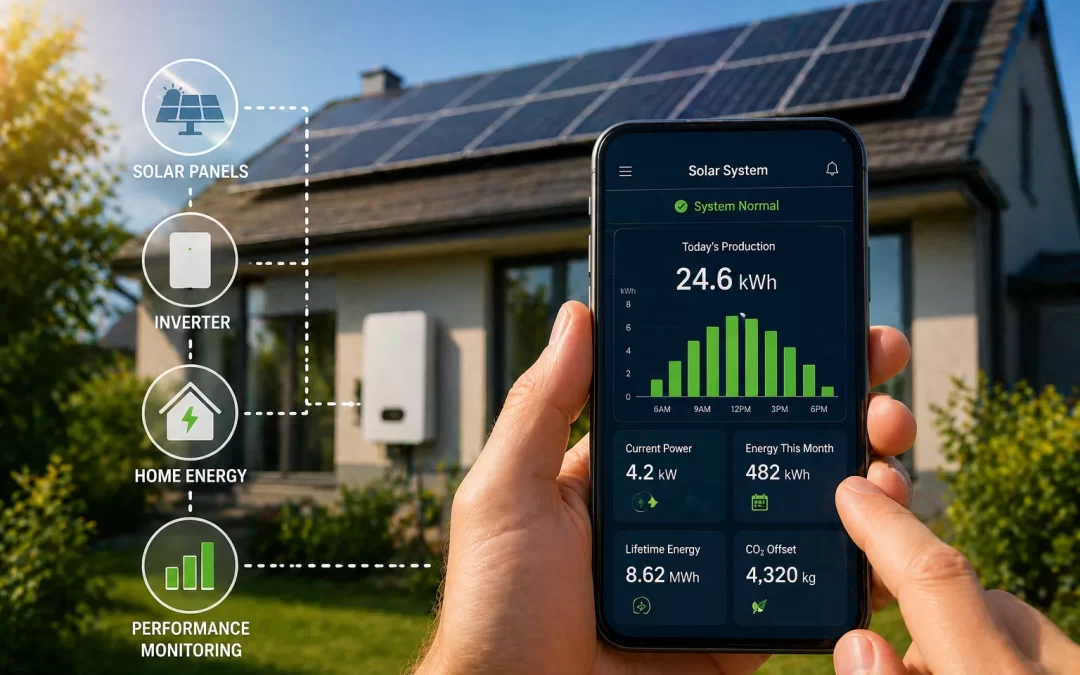
To monitor your solar system’s performance, check your inverter or monitoring app regularly to confirm your system is on, producing power, and roughly matching what your installer estimated. Most modern systems include online monitoring that shows daily, monthly, and lifetime production, plus alerts if something is wrong. For best results, compare your solar production to your electric bills and your installer’s forecast at least once a month. Just keep in mind that weather, seasons, and shading can cause normal ups and downs, so you’re looking for patterns over time, not perfection every day.
Monitoring your solar system’s performance is the easiest way to protect your investment and catch small issues before they turn into lost savings. This guide is for U.S. homeowners who already have solar (or are close to installing) and want to know what “normal” looks like and how to spot problems. We’ll walk through simple steps, realistic benchmarks, and when it’s time to call your installer or a pro.
Table of Contents
- Why Monitoring Your Solar System Matters
- How to Monitor Your Solar System’s Performance (Step by Step)
- What “Normal” Solar Performance Looks Like
- Key Solar Numbers and What They Mean for Monitoring
- Seasonal and Weather Impacts on Solar Monitoring
- Signs Your Solar System May Have a Problem
- Monitoring Tools and Methods (Apps, Portals, and Manual Checks)
- When You Can Troubleshoot Yourself vs. When to Call a Pro
- How to Decide What to Do Next
- Frequently Asked Questions
- Summary
- Get Personalized Solar Help
Why Monitoring Your Solar System Matters
Once your solar panels are installed, they’re designed to run quietly in the background for 25–30 years. But “set it and forget it” is not a good strategy. Monitoring helps you make sure your system is actually delivering the savings you paid for.
Here’s why regular monitoring matters:
- Protect your investment: A typical residential system costs $28,000–$32,000 before incentives, so catching problems early really matters.
- Maximize savings: The average U.S. homeowner saves about $1,300–$1,500 per year on electricity with solar. If your system underperforms for months, you may lose hundreds of dollars without realizing it.
- Catch equipment issues early: Inverter failures, tripped breakers, or a single bad panel can quietly cut production.
- Support warranty claims: Good monitoring data can help if you ever need to make a solar panel warranty claim.
Monitoring doesn’t need to be complicated. For most homeowners, a quick monthly check-in is enough to confirm everything looks normal.
How to Monitor Your Solar System’s Performance (Step by Step)
Most modern solar systems include some form of online monitoring through your inverter or a separate device. Here’s a simple process you can follow.
Step 1: Know what equipment you have
Before you can monitor effectively, you need to know what you’re looking at.
- Inverter type: String inverter, microinverters, or DC optimizers. This affects what your monitoring app can show (system-level vs. panel-level data).
- Monitoring platform: Common brands include Enphase Enlighten, SolarEdge, SMA Sunny Portal, and proprietary apps from installers.
- Utility meter: Your electric meter may show when you’re exporting power back to the grid.
Your installer should have given you login details and a quick walkthrough. If you never received this, contact them and ask for access to your monitoring portal.
Step 2: Check daily or weekly at a glance
You don’t need to obsess over your system, but a quick glance can catch obvious problems.
- Open your monitoring app or web portal.
- Confirm the system is “online” or “producing.”
- Look at today’s production and compare it to recent sunny days.
- Scan for any error messages, alerts, or offline components.
On cloudy days, production will naturally be lower, so focus on patterns over several days, not one-off dips.
Step 3: Do a monthly performance check
Once a month, spend 5–10 minutes doing a deeper check:
- Review monthly production in your app.
- Compare it to the same month last year (if you have at least 12 months of data).
- Compare it to your installer’s original estimate for that month, if you have it.
- Look at your electric bill to see how much grid power you still used.
You’re looking for big, unexplained drops (for example, 30–50% lower than expected on mostly sunny months), not small variations.
Step 4: Track your annual performance
Once a year, do a quick “annual health check” of your system:
- Note your total annual solar production (kWh) from your monitoring app.
- Compare it to the annual production estimate from your installer.
- Check your total annual electric costs before solar vs. after solar.
If your system is consistently 10–20% below the original estimate, it’s worth investigating further. Some variation is normal, but large gaps may indicate a problem.
What “Normal” Solar Performance Looks Like
To monitor effectively, you need a sense of what’s normal so you don’t worry about every small change.
Daily and seasonal ups and downs
Normal patterns include:
- Sunny vs. cloudy days: Cloudy days can cut production by 50% or more compared to clear days.
- Summer vs. winter: In most of the U.S., summer production can be 2–3 times higher than winter production due to longer days and higher sun angles.
- Week-to-week variation: A stormy week will look “bad” compared to a sunny week, even if your system is working perfectly.
Year-to-year changes
Solar panels slowly lose output over time, but it’s gradual:
- Most panels are warranted to produce at least 80–85% of their original output after 25 years.
- That works out to roughly 0.5–0.7% loss per year.
- You should not see big year-to-year drops unless there’s a specific issue (shading, dirt, equipment failure).
When performance is in your favor
Your system may perform better than expected when:
- You live in a sunnier-than-average area.
- Your roof faces close to due south with a good tilt and no shading.
- Your installer used conservative assumptions in their estimate.
When performance may look worse (but still be normal)
Lower-than-expected production can still be normal if:
- You had an unusually cloudy or smoky season (wildfire smoke can reduce sunlight).
- Snow covered your panels for part of the winter.
- Trees grew and now cast more shade than when the system was installed.
If you’re unsure whether a drop is normal or a problem, compare your system’s pattern to local weather data or ask your installer for a performance review.
Key Solar Numbers and What They Mean for Monitoring
Understanding a few key numbers will help you make sense of your monitoring data and your electric bills.
System size and cost benchmarks
- Typical system size: Most U.S. homes install 15–25 panels, usually 6–10 kW (kilowatts) of capacity.
- Cost per watt: Around $2.50–$3.50 per watt before incentives, depending on your state and equipment.
- Total system cost: Roughly $28,000–$32,000 before incentives for a typical home.
- After 30% federal tax credit (ITC): Net cost often falls to about $19,600–$22,400, but always confirm details with a tax professional.
Because you’re investing this much, it’s worth making sure your system is performing close to expectations.
Production and savings benchmarks
- Annual savings: Many homeowners save about $1,300–$1,500 per year on electricity, depending on local rates and system size.
- Payback period: Nationally, a 7–9 year payback is common, though it can be shorter in high-electricity-cost states.
- Panel lifespan: Panels typically have a 25–30 year performance warranty and can last 30–35 years or more.
When you monitor, you’re checking whether your real-world production and bill savings are on track to meet these general benchmarks for your area and system size.
What affects your specific numbers
Your actual performance and savings will vary based on:
- Location: Sunlight levels (solar resource) vary widely by state and even within a state.
- Roof orientation and tilt: South-facing roofs generally perform best; east/west can still work well but may produce less.
- Shading: Trees, chimneys, and nearby buildings can cut production significantly.
- Utility rates and policies: Net metering rules and time-of-use rates affect how much your solar power is worth.
Monitoring helps you see how these factors play out in your actual day-to-day and year-to-year performance.
Seasonal and Weather Impacts on Solar Monitoring
Many homeowners worry when they see big seasonal swings in their monitoring app. Most of the time, this is completely normal.
Winter vs. summer production
- In many parts of the U.S., winter production can be 40–70% lower than summer production.
- Shorter days, lower sun angles, and more cloudy weather all contribute.
- Snow on panels can temporarily stop production until it melts or slides off.
If you’re curious how your system should behave in cold weather, our guide on how solar panels work in winter explains what’s normal and when to be concerned.
Clouds, smoke, and haze
Weather and air quality can cause noticeable dips in your monitoring graphs:
- Cloudy days: Expect softer, lower “humps” in your daily production curve.
- Wildfire smoke or heavy haze: Can reduce sunlight even on days that look bright.
- Storms: Production may be near zero during heavy storms, which is normal.
When seasonal changes are a red flag
Seasonal changes become concerning when:
- Your system used to bounce back in spring but now stays low even on clear days.
- You see a sudden, lasting drop in production that doesn’t match local weather patterns.
- One part of your array (for example, one string or group of panels) is much lower than the rest.
In those cases, it’s worth checking for new shading (tree growth), dirt buildup, or equipment issues.
Signs Your Solar System May Have a Problem
Monitoring is most valuable when it helps you catch real issues early. Here are the most common warning signs.
Clear warning signs in your monitoring app
- System status shows “offline,” “fault,” or “error” for more than a brief period.
- One or more panels show zero production on a sunny day (for systems with panel-level monitoring).
- Production suddenly drops by 30–50% or more and stays low for days or weeks.
- You receive email or app alerts from your monitoring provider or installer.
Clues from your electric bill
Even if you rarely open your monitoring app, your utility bill can tell you a lot:
- Your grid usage suddenly jumps compared to the same month last year.
- You’re no longer seeing credits or reduced charges during sunny months.
- Your bill looks similar to pre-solar levels, even in peak summer.
Physical signs on your roof or equipment
From the ground (or safely from a window), look for:
- Obvious shading from new tree growth or nearby construction.
- Heavy dirt, leaves, or debris covering panels.
- Inverter lights that are red, flashing, or off during a sunny day.
If your system is producing less than expected and you’re not sure why, our guide on why solar systems produce less than expected walks through common causes and next steps.
Monitoring Tools and Methods (Apps, Portals, and Manual Checks)
Most homeowners rely on a mix of automated monitoring and simple bill checks. Here’s what’s available and how to use it.
Inverter-based monitoring apps
These are the most common and user-friendly tools:
- What they show: Real-time power (kW), daily/weekly/monthly energy (kWh), and sometimes panel-level data.
- Pros: Easy to use, often include alerts, accessible from your phone or computer.
- Cons: Depend on your home internet connection; if Wi-Fi goes down, data may be delayed or missing.
Third-party monitoring devices
Some systems include or can add separate monitoring hardware:
- Consumption monitors: Track both solar production and your home’s total usage.
- Smart panels or energy monitors: Show which circuits or appliances use the most power.
- Pros: More detailed insight into how you use energy, not just what you produce.
- Cons: Extra cost; more data than some homeowners want to manage.
Manual monitoring using your utility bill
Even without apps, you can still monitor performance:
- Compare your monthly kWh usage and costs before and after solar.
- Look at any “net metering” line items or credits.
- Track your bills over a full year to see seasonal patterns.
This method is less precise but still useful for spotting big changes or problems.
When You Can Troubleshoot Yourself vs. When to Call a Pro
Not every dip in performance requires a service call. Here’s how to decide what you can safely handle and when to bring in an expert.
Issues you can usually check yourself
These are safe, basic checks most homeowners can do:
- Confirm your main solar breaker is on (usually labeled near your main panel).
- Check your inverter display for error codes or status lights.
- Verify your Wi-Fi or internet is working if your monitoring app shows “offline.”
- Look for obvious shading or debris from the ground.
If your panels are dirty and easily reachable from the ground with a hose or long brush, you may be able to clean them yourself. Our guide on how to clean solar panels explains when and how to do this safely.
Issues that usually require a professional
Call your installer or a qualified solar technician if:
- You see persistent error codes or red lights on your inverter.
- Production is significantly lower than expected for weeks with no clear weather-related reason.
- You suspect a wiring, roof, or structural issue.
- You need to go on the roof to inspect or fix anything (for safety and warranty reasons).
Inverter problems are especially important to address quickly, since the inverter is the “brain” of your system. For more detail, see our guide on diagnosing and fixing common solar inverter problems.
Warranty and installer support
Most systems come with:
- Panel warranties: 25–30 years for performance, 10–25 years for product defects.
- Inverter warranties: Often 10–12 years, sometimes extendable.
- Workmanship warranties: Typically 5–10 years from your installer.
If you suspect a hardware issue, contact your installer first. They can often review your monitoring data remotely and tell you whether a site visit is needed.
How to Decide What to Do Next
Monitoring is only useful if it leads to the right actions. Here’s how to decide your next step based on what you’re seeing.
If everything looks normal
Keep doing what you’re doing:
- Check your app briefly once a week or so.
- Do a deeper review once a month and once a year.
- Keep an eye on your electric bills to confirm your savings stay on track.
If performance is a bit lower than expected
Consider these steps:
- Compare your production to local weather patterns for the same period.
- Check for new shading or dirty panels.
- Review your installer’s original estimate and assumptions.
- Ask your installer for a performance review if you’re consistently 10–20% below estimates.
If performance is much lower or you see errors
Act sooner rather than later:
- Document what you’re seeing (screenshots, dates, and notes).
- Contact your installer or monitoring provider with specific details.
- Ask whether the issue is covered under equipment or workmanship warranties.
- Avoid DIY electrical work or roof work that could void warranties or create safety risks.
For homeowners still deciding whether to go solar
If you’re still in the research phase, understanding monitoring can help you choose the right installer and equipment. Before you get quotes, it can help to review an honest overview like our guide on whether solar is worth it and a detailed solar cost and savings breakdown so you know what to expect and what to ask.
Frequently Asked Questions
How often should I check my solar monitoring app?
A quick glance once a week and a deeper review once a month is enough for most homeowners. You’re mainly checking that the system is online, producing power on sunny days, and roughly matching your installer’s estimates over time.
What is a normal amount of solar production for a home system?
A typical 6–10 kW residential system might produce roughly 7,000–14,000 kWh per year, depending on your location, roof, and shading. Your installer should provide a site-specific estimate, which is the best benchmark to compare against in your monitoring app.
Why does my solar production drop in winter?
Winter production is usually lower because days are shorter, the sun is lower in the sky, and there are more cloudy days. In snowy climates, snow on panels can temporarily stop production until it melts or slides off, which is normal and usually short-lived.
My monitoring app shows “offline.” Is my solar system not working?
Not necessarily. “Offline” often means the monitoring device lost its internet or Wi-Fi connection, not that the system stopped producing. Check your home internet and inverter lights; if production appears normal at the inverter but the app stays offline, contact your installer or monitoring provider.
How do I know if my solar system is saving me money?
Compare your current electric bills to your bills from before you installed solar, ideally over a full year. Your monitoring app will show how many kWh your system produced; when that production lines up with lower grid usage and lower bills, your system is doing its job.
Can I monitor my solar system without an app?
Yes. You can read production data directly from your inverter’s display and compare your utility bills before and after solar. This won’t give you as much detail as an app, but it’s still enough to spot major changes or problems.
Summary
- Monitoring your solar system’s performance means regularly checking that it’s on, producing power, and roughly matching your installer’s estimates over months and years.
- A typical U.S. home system costs $28,000–$32,000 before incentives and saves about $1,300–$1,500 per year, so catching performance issues early protects a major long-term investment.
- Weather, seasons, shading, and equipment issues are the biggest factors that affect what you’ll see in your monitoring app.
- Most homeowners can handle basic checks themselves, but persistent errors, big production drops, or electrical issues should be handled by a qualified installer or technician.
- Your best next step is to establish a simple weekly and monthly monitoring routine and keep an eye on your electric bills to confirm your savings stay on track.
Get Personalized Solar Help
Every home, utility, and solar system is different, so the best way to know if your system is performing well—or to plan a new system you can easily monitor—is to get personalized quotes and advice. When you’re ready to see real numbers for your roof and your utility rates, you can compare multiple installer proposals and monitoring options at /get-my-quote/ with no pressure and no obligation.